
How to Choose the Right Laptop for Your Actual Needs (Specs Not Hype)

In a market flooded with flashy numbers, it’s easy to get caught up chasing the latest processor speeds, massive RAM counts, or ultra-high display resolutions. But for most of us—remote workers, students, and casual browsers—the “best” laptop isn’t the one with the highest benchmark score. It’s the one that survives a coffee shop session without needing a charger, feels comfortable during a three-hour writing stint, and fits your budget.
This guide helps you cut through the marketing noise and make a confident choice grounded in what you actually do every day.
Why Spec-Based Marketing Often Leads You Astray
Manufacturers love numbers because numbers are easy to sell. However, your daily experience isn’t defined by a benchmark; it’s defined by usability.
- Specs aren’t your daily tasks: A top-tier chip is impressive, but if your day consists of Google Docs, Slack, and Netflix, you won’t feel the difference between a $2,000 “pro” machine and a well-optimized mid-range model.
- Real life isn’t optimized: Labs test laptops in perfect conditions. In reality, you need a machine that handles “messy” use—like having 30 Chrome tabs open while hopping on a video call without the fans sounding like a jet engine.
- Ergonomics trump power: A lightning-fast CPU won’t help you if the keyboard feels mushy or the screen is too dim to use near a window.
The “Sweet Spot” Everyday Machine
For most users, the goal is finding a laptop that balances portability with enough power to stay snappy for 4-5 years. The current gold standard for this “invisible performance” is the Apple MacBook Air (M2 or M3 models). It lacks a fan (so it’s silent), stays cool, and offers battery life that actually lasts a full workday.
🛍️ Recommended: Apple MacBook Air M2, MacBook Air M3, MacBook Air 13 M2, MacBook Air 15 M3


Identify Your Actual Usage Needs
Instead of looking at a spec sheet, look at your calendar and your desk. How do you actually spend your time?
1. The Productivity Workhorse (Writing & Research)
If you spend your day in Word, Notion, or academic databases, your priorities should be keyboard travel and aspect ratio. A taller 16:10 screen allows you to see more of your document without scrolling. For this type of work, reliability is king.
2. The Student & Commuter (Mobility First)
If your laptop lives in a backpack, weight is your most important “spec.” You need a device under 3 lbs that can wake up instantly when you open the lid in a lecture hall or on a train. The Microsoft Surface Laptop or high-end Chromebooks are excellent choices here, offering great build quality without the “gaming laptop” bulk.
🛍️ Recommended: laptop for students remote work video calls lightweight 14 inch 15 inch Intel Core i5 Ryzen 5 16GB

Prioritizing the “Must-Haves” Over “Nice-to-Haves”
When you are ready to click “buy,” ensure you aren’t compromising on these three critical tactile areas:
- The Trackpad and Keyboard: You touch these every single second you use the computer. If the trackpad is erratic or the keys feel shallow, you will regret the purchase within a week, regardless of how fast the processor is.
- Sustained Battery Life: Look for “real-world” battery reviews rather than manufacturer claims. If a laptop can’t hit 8–10 hours of web browsing, you’ll be tethered to a wall.
- Port Selection: If you find yourself needing to carry three different dongles just to plug in a mouse or a monitor, that laptop isn’t saving you any space.
The Essential Hybrid Setup
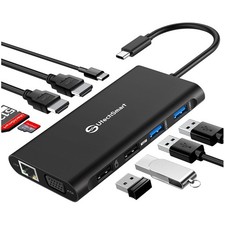
Sometimes, the “right laptop” is actually a modest laptop paired with the right accessories. If you work from home but travel occasionally, investing in a high-quality USB-C Docking Station or a Portable Monitor can turn a mid-range laptop into a high-productivity workstation.
🛍️ Recommended: USB-C Docking Station, Portable Monitor



Final Verdict
Don’t pay for power you’ll never use. If you aren’t editing 4K video or compiling massive codebases, ignore the “Pro” and “Ultra” labels. Focus on a great screen, a comfortable keyboard, and a battery that keeps up with your life. That is where the real value lives.